The best AI tool for creating slide decks is Gamma.

AI slide generators can design ten slides in just seconds; somehow, businesses still spend like 30-plus minutes fixing charts, fonts, and brand slips. We checked eight leading business-slideshow tools to find which one cuts that polish time the most. And surprisingly, half run inside PowerPoint or Google Slides. The next half export sometimes messily into those apps. We made a benchmark that tracks a single metric: minutes from blank page to executive-ready deck.
Read the whole blog to know the spot on which the tool frees you fastest while respecting your workflow, budget, and brand standards.

Choose the tool that already fits your workspace and saves the most cleanup time.
Begin with the ecosystem you already pay for, check how strict your brand rules are, and read the detailed sections below. We have measured cleanup time, export fidelity, and actual-world value, so you can pick the quickest path to an executive-ready presentation.
Dozens of “best AI slideshow” posts recycle the same names, even when a product hasn’t shipped an update in a year. We began with 60-plus candidates from recent comparison pages and vendor sites, then applied six business-focused filters to narrow the list to eight.
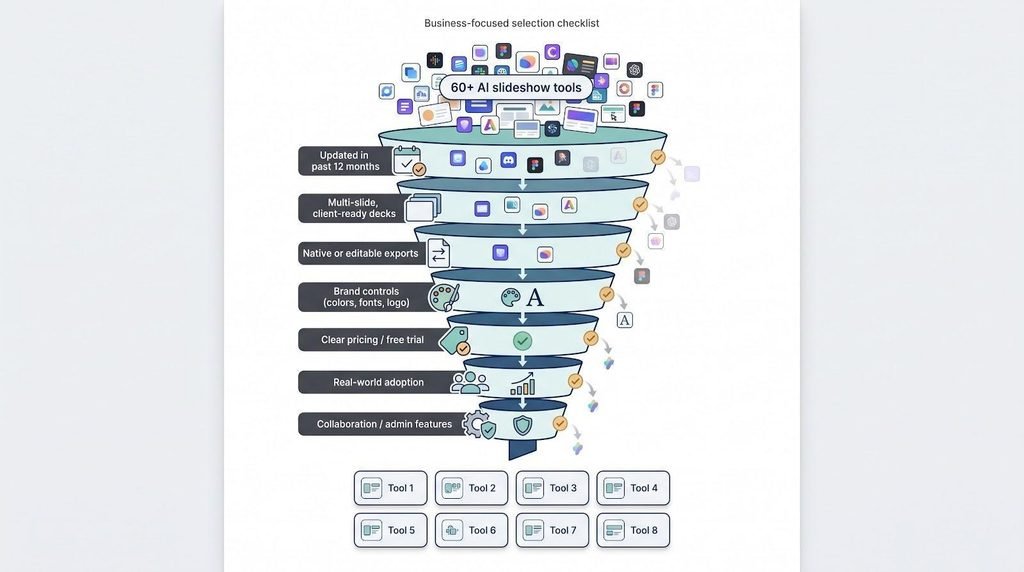
Only eight tools cleared every bar. The next sections detail our common test brief, scoring model, and what we call “business-ready.”
We measured how close each business slideshow tool gets you to a board-ready deck, before you touch a shape or font. Every platform faced the same brief and the identical stopwatch.
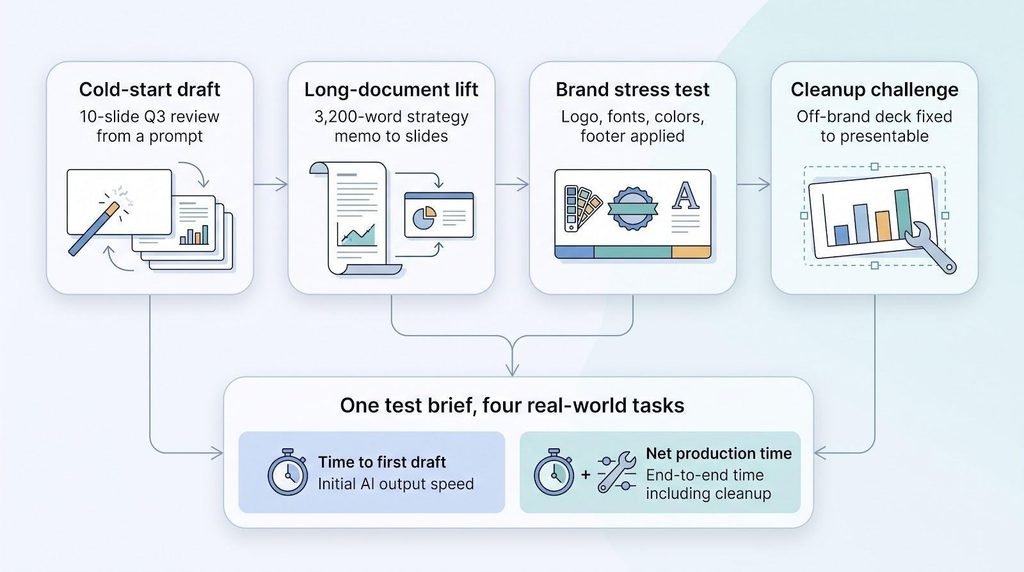
Across all tasks, we captured two headline numbers:
Those figures, mixed with brand-compliance scores and export fidelity, power the verdicts you will see in each product section.
Consider Plus AI as an AI co-worker living inside the slide software you already use. Open the Plus AI app from the PowerPoint ribbon or the Google Slides add-on menu, enter a prompt or upload a document, and seconds later you are editing fully native slides. Plans begin at 10 dollars per user, and the company reports SOC 2 Type II compliance for data security.
Because the file stays inside Microsoft 365 or Google Workspace, comments, version history, and shared drives keep working. In our benchmark, Plus produced the cleanest first draft: slide masters stayed intact, charts remained editable, and every font paired with the brand kit. Cleanup took 12 minutes, compared with 30 minutes for Copilot and more than 40 for Gemini.
Beyond first drafts, Plus converts a 30-page PDF into a deck, rewrites cluttered slides with Remix, and suggests quick edits, for example, adding a customer quote, all without leaving the canvas.
Guardrails are important. There is no free-forever tier; the Pro plan is needed for file uploads. Imported documents pull text but not embedded charts or images, and generation or Remix tops out at 30 slides (you can run multiple passes).
If your team already works in PowerPoint or Google Slides, Plus AI provides the fastest route from blank page to board-ready deck, with no exports and no reformatting.
Copilot lives inside PowerPoint, turning a chat prompt into a full deck in seconds. Type “Create a Q3 business review,” and it drafts an outline, visuals, and speaker notes. Ask “Turn slide 4 into a three-column comparison,” and Copilot rewrites the layout without breaking your theme.
Copilot’s edge is context. It pulls numbers from Word docs, Teams chats, and SharePoint libraries, so KPIs stay consistent across slides. Brand Kits and asset libraries keep colors, fonts, and logos on template, provided IT has configured them.
In our benchmark, Copilot’s story flow matched Plus AI, but two KPI charts defaulted to PowerPoint blue, adding 10 cleanup minutes. The file stayed 100 percent editable, and animation timings survived every export, a claim no standalone generator matched.
Cost is the trade-off. Copilot starts at 23.50 dollars per user per month on Microsoft 365 Business Standard with Copilot and rises to 32 dollars on Business Premium. Agentic, multi-step actions in PowerPoint became available on 22 April 2026, but you will need an admin to enable them. If your finance team already lives in Excel and your decks embed Power BI charts, the premium feels justified; otherwise, pairing Copilot with Microsoft 365 may outweigh the local convenience.
Google turned on native, multi-slide generation in Slides on 30 June 2026, so Gemini now creates a whole deck without exports or add-ons.
Gemini builds an outline, asks follow-up questions, and drops editable text boxes, charts, and images onto brand-matched layouts. Because the file is a Google Slides doc, comments, version history, and real-time co-editing stay intact.
In our brand test, Gemini matched fonts and colors but missed the logo safe area on two slides, adding seven minutes of nudging. Story flow fell between Plus AI and Copilot, although it tied Copilot for the most repetitive stock images.
Cost is straightforward: Gemini is combined with Google Workspace Business Standard (14 dollars annual / 16.80 flexible per user) or higher. Heavy marketing teams may hit usage caps sooner than finance or project groups.
Watch-outs: full-deck creation is English-only for now, and brand governance is cheaper than Microsoft’s SharePoint asset libraries. If your organization already runs on Gmail, Drive, and Meet, Gemini provides the quickest way to add AI slide creation without leaving Google’s ecosystem.
Gamma 5, released 6 October 2026, overhauled the application with free-form editing and broader visual styles, so your deck no longer screams “AI template.” Type a topic and Gamma unwraps a slick, scrollable presentation in seconds. That makes it handy for brainstorms, pitches, and landing-page narratives.
Speed meets polish: drop a KPI spreadsheet into a slide and live charts sync back to Google Sheets; share a link, and viewers get responsive navigation, reactions, and analytics.
Exporting is where the magic becomes task. Gamma now outputs editable PowerPoint, Google Slides, and PDF, and tables stay live rather than flattening. Even so, our cleanup log showed 14 misaligned text boxes and one missing footer in the PPTX. Net production time hit 37 minutes, respectable yet double Plus AI and well above Copilot.
Pricing starts free with 400 non-renewing credits. The Plus plan is nine dollars per seat, and Pro is 18. Heavy users should budget for extra credit bundles. If your client is happy with a web link, Gamma saves you the most time; if they need a pristine PPTX, plan for an extra editing round.
Beautiful.AI treats every slide as a smart layout. Drop a headline or chart, and its Smart Slide engine rearranges spacing, alignment, and fonts automatically, a relief for anyone who dislikes fine-tuning shapes.
A 18 March 2026 update introduced a context-aware “Create with AI” workflow and came with a 45-million-dollar funding round. Feed the tool a document, link, or outline, and it suggests slide types before placing content. In our brand test, it delivered the only zero-violation outcome: colors, typography, and footer all landed perfectly.
Rigidity is the flip side. Add one data point to a crowded KPI slide and the layout pushes back; you begin a new Smart Slide rather than nudging shapes. Power users may feel boxed in compared with Gamma or Canva.
Export fidelity is solid. The PowerPoint add-in opens Smart Slides as grouped, editable objects (animations drop on import). Cleanup clocked 22 minutes, midway between Plus AI and Gamma.
Pricing: 12 dollars per month for solo creators and 40 per seat for teams unlocking Brand Kits, shared assets, and enterprise citations. If consistency beats creativity in your workflow, Beautiful.ai offers the guardrails you will appreciate every deadline week.
Canva feels less like a slide maker and more like a complete creative studio in your browser. Presentations sit beside social posts, infographics, videos, and quick websites, so one design can morph into an Instagram story, a PDF handout, or a landing page without even leaving the platform.
Canva AI 2.0, unveiled at Canva Create on 16 April 2026, added conversational creation. Type “Create a ten-slide product-launch deck,” and Magic Design drafts layouts, copy, and on-brand photos. Brand Controls lock colors, fonts, and logos, keeping every file on template.
The layered editor shines when you want to tweak visuals. You can swap a background video, drag a chart edge, or animate a call-out button. Hand-off is tougher: our PowerPoint export opened with missing fonts and flattened animations, adding 25 cleanup minutes.
Pricing operates from a generous free tier to enterprise contracts. Solo creators pay 15 dollars per month for Canva Pro, while teams pay 10 per seat per month (billed annually) for Canva Business, which includes Brand Kits and larger media libraries. If your marketing team juggles multiple asset types, one subscription can replace many niche tools. For slide-only workflows, the extras may feel like overkill.
Pitch is designed for revenue teams that move fast. Open a template, invite a rep, and watch slides update in real time. Pitch Agent, launched 27 May 2026, allows you to describe a deal stage or paste a discovery-call transcript; the agent reshapes the deck while keeping your template intact.
The key value appears after you press Share. Pitch Rooms publish your slides as a branded microsite with embeds and calls to action. Engagement analytics show who saw each slide and for how long. Our testers fed that data back to Pitch Agent and produced three personalized follow-ups in minutes.
File fidelity is solid but not flawless. Exported PPTX files kept editable text and shapes, yet charts flattened to images, adding nine cleanup minutes.
Pricing begins free. The Pro plan is 20 dollars per seat per month, and Business tiers start higher. Heavy personalization burns credits quickly, so many enterprise sellers budget for the Business plan or additional bundles.
If your quota depends on data-driven follow-ups and you care as much about what buyers do after the meeting as what you show during it, Pitch needs a spot in your slideshow toolkit.
Prezi tells stories like a shifting mind-map: you park ideas on one canvas, then zoom in and out to reveal detail. Prezi AI, introduced in 2024, adds prompt-to-deck generation. Explain your workshop, pick a style, and watch sections, sub-topics, and animated paths appear.
The format keeps audiences engaged. Quizzes, polls, and live word clouds sit alongside charts and images, making workshops two-way rather than broadcast. In our test, learners responded in real time, and analytics flagged which Zoom stops drew the most questions.
Hand-off is trickier. Prezi now exports to PowerPoint, but the signature Zoom influence flattens into linear slides; we spent 12 minutes retiming reveals. Present through Prezi’s web player to keep every animation.
Pricing starts free. The Standard plan is seven dollars per month billed annually and covers AI with a credit cap; Plus (19 dollars) removes caps and adds brand kits. If you run workshops or classes that survive on interaction, Prezi AI delivers energy no static business-slideshow tool can match.
Here are some head-to-head results:
| Tool | Tweaks needed | Main issues spotted |
| Plus AI | 12 min | 2 minor copy edits |
| Copilot | 18 min | KPI charts defaulted to blue |
| Gemini | 25 min | Repeated stock image 3× |
| Beautiful.ai | 30 min | Limited layout flexibility |
| Gamma | 32 min | Missing brand footer on 4 slides |
| Canva | 34 min | Fonts replaced after export |
| Pitch | 38 min | Analytics great, but more edits |
| Prezi | 42 min | Zoom paths absent in export |
Blind reviewers said Plus AI’s deck was “ready to send” after two copy tweaks, while Copilot was close, tripped only by off-palette charts.
| Tool | Native or export | Cleanup time | Key breakages |
| Plus AI | Native | <5 min | None |
| Copilot | Native | <5 min | One font warning |
| Gemini | Native | <5 min | Lost one custom transition |
| Gamma | Export | 14 misaligned text boxes | |
| Beautiful.ai | Export | Animations flattened | |
| Canva | Export | Brand fonts dropped | |
| Pitch | Export | Brand fonts dropped | |
| Prezi | Export | Zoom motion lost |
If stakeholders must keep editing the file, choose a native tool. Every export introduces risk and late-night formatting.
Our blind reviewers scored each business slideshow tool on story coherence, slide variety, and brand accuracy.
| Rank | Tool | Cleanup time | Main fixes |
| 1 | Plus AI | 12 min | Two copy tweaks |
| 2 | Copilot | 18 min | KPI charts off-palette |
| 3 | Gemini | 25 min | Repeated stock image ×3 |
| 4 | Gamma | 30 min | Missing footers on 5 slides |
| 5 | Beautiful.ai | 30 min | Smart Slide felt rigid |
| 6 | Canva | 34 min | Fonts replaced after export |
| 7 | Pitch | 38 min | Charts flattened |
| 8 | Prezi | 42 min | Zoom paths lost in PPTX |
Why the gap? Plus AI’s native add-ins kept slide masters, fonts, and charts correct on arrival. Copilot missed only two chart colors, while Gemini’s solid narrative was dragged down by recycled imagery. Web-first tools such as Gamma looked impressive but stumbled on brand footers once exported.
Bottom line: plan extra time for any generator that is not native to PowerPoint or Google Slides; the polish phase can double your workload.
Native tools win every time. Because Plus AI, Copilot, and Gemini create inside PowerPoint or Slides, nothing flattens in transit: text boxes, charts, slide masters, and notes stay editable.
| Tool | Workflow | Cleanup time | Biggest breakage |
| Plus AI | Native | <5 min | None |
| Copilot | Native | <5 min | One custom font warning |
| Gemini | Native | <5 min | Lost one custom transition |
| Gamma | Export | 14 misaligned text boxes | |
| Beautiful.ai | Export | Animations flattened | |
| Canva | Export | Brand fonts dropped | |
| Pitch | Export | Brand fonts dropped | |
| Prezi | Export | Zoom motion lost |
If colleagues need to keep editing the file, stay with a native business slideshow tool. Every export introduces risk and extra formatting time.
Reddit threads usually repeat three complaints:
These points are valid, yet workflow describes most of them.
Design sameness is fading. Gamma 5’s broader designs, Canva AI 2.0’s layered editor, and Pitch Agent’s template-driven layouts all shipped in 2026. In our blind review, Gamma’s newest theme tied Copilot for “least AI-looking” slides.
Rebuild pain comes from exports. Plus AI, Copilot, and Gemini generate decks locally, so nothing flattens; Reddit complaints often refer to standalone tools exporting to PowerPoint.
Time savings grow with longer inputs. Turning a 3,000-word strategy memo into a deck took 25 minutes in Plus and Copilot versus hours by hand. Even the slowest business slideshow tool completed in under an hour, far above the “ten-percent” claim.
Treat online comments as signal, not final verdict. Align each complaint with your workflow, test two tools on a real brief, and track the net production hours. Results change quickly when the deck stays native, the brand kit loads automatically, and the prompt is more than a single sentence.
Begin with the file your stakeholders expect. If leadership edits in PowerPoint, a web-only deck can mean late-night cleanup. Ask yourself two quick questions:
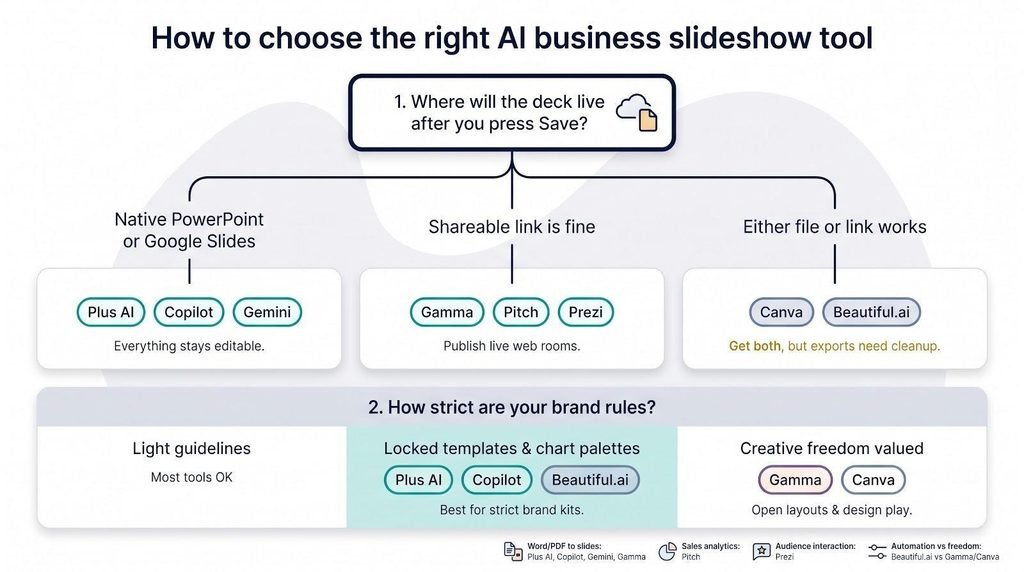
1. Where will the deck live after you press Save?
2. How strict are your brand rules?
Then weigh the extras:
Run your own 10-slide test, time the cleanup, and choose the faster finish. The stopwatch beats any feature checklist.
The best AI tool for creating slide decks is Gamma.
Yes, ChatGPT can create PPT slides.
Yes, there are better alternatives to PowerPoint, such as Canva and Pitch.