The main advantage of using HIX AI is that it streamlines the design process by organising information into visually appealing slides.

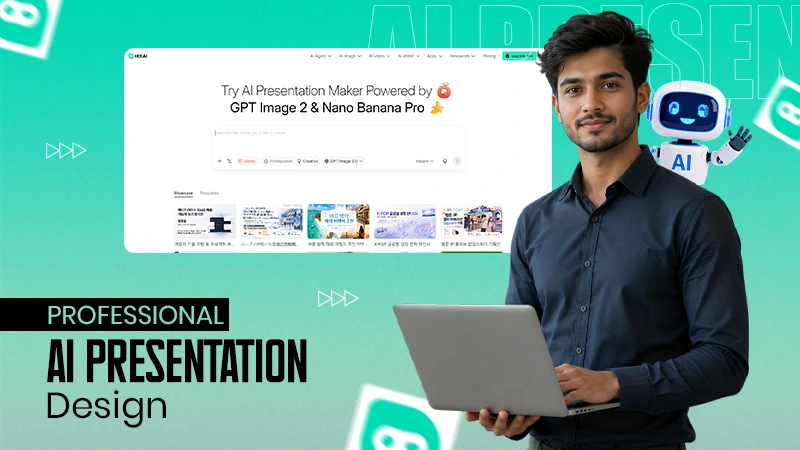
Professional presentations take a lot longer than what people usually expect. You can end up spending many hours gathering information, setting up the layouts, correcting designs, and tweaking little details. This makes the whole process feel like an annoying chore, particularly if you have to create slides regularly.
Today’s professionals require a quicker method of transforming ideas into clear and compelling presentations. HIX AI simplifies the task by including research, content generation, and slide design into a single dashboard.
Let’s take a look at how this functionality allows users to prepare quality presentations without spending the whole day changing tools or performing repetitive design work.
Key Takeaways
- HIX AI’s Slides feature an AI-powered approach to generating presentations, enabling users to break away from the limitations of pre-designed templates and create professional presentations
- The consistency of the brand is key for companies and teams. HIX AI lets users upload brand elements or select existing templates, ensuring a uniform look throughout the slides.
- Users can change, add, and edit content and improve sections without having to rebuild the slide from scratch
- This AI-backed method enables experts to design more polished presentations without spending hours tweaking every element
The first step of a good presentation is having a clear idea. But creating a full-length slideshow out of a topic demands planning, research, and creativity. Here’s where HIX AI can assist with the entire creation process.
Users enter a topic, document, URL, or information source, and the system assists in structuring the information into a presentation. It can determine key takeaways, establish a logical sequence, and even produce slides that are more manageable for the audience.
HIX AI’s Slides feature an AI-powered approach to generating presentations, enabling users to break away from the limitations of pre-designed templates and create presentations that are aligned to their objectives.
Selecting the best presentation tool can make a huge impact on the speed and efficiency of your slide creation. Integrating research, content creation, design, and editing into a single platform, HIX AI streamlines the entire presentation process for professionals.
AI slides generator simplifies the process of creating slides from information. Users can begin by picking a topic, document, URL, or image and transform it into a well-organised presentation. This will help you save time, since users do not have to manually copy information, organise each section, and create slides from an empty page.
HIX AI makes it easy for users to produce slides with a consistent look and feel, even if they don’t have the expertise needed for high-quality design. It helps to provide proper formatting, layout, and a professional presentation.
The consistency of the brand is key for companies and teams. HIX AI lets users upload brand elements or select existing templates, ensuring a uniform look throughout the slides. This helps the software develop presentations that appear more professional and business-oriented.
Fun Fact
Some advanced tools scan the web to write professional text and write the speaker notes you need to read aloud.
Using the AI-powered software, users can boost the content of their slides, update elements, and refine sections efficiently, thus optimizing the whole process.
Users don’t have to spend time making all the changes manually. Instead, they make changes fast and concentrate on the overall message.
The major advantage of HIX AI is the ability to minimise the need for switching between tools. Research, writing, design and editing can occur in a single combined workspace. This single window experience saves time and prevents professionals from having to handle multiple applications.
There are lots of people who have great ideas, but just have trouble with the presentation design. Without experience in design, it can be tricky to select a layout, find the right balance of text, and create visual consistency.
Professional presentations require more than simple information. They must be structured, clear, and attention-grabbing. This becomes a tiresome process, as each slide has to be customized individually, taking hours to create.
The main advantage of using HIX AI is that it streamlines the design process by organising information into visually appealing slides. Users can create presentations with consistent designs, appropriate visuals, and clean layouts without specialised skills.
This simplifies the process of creating a presentation for professionals, students, entrepreneurs, and teams who require impressive slides without the hours of learning and using complex design software.
The great benefit of AI-driven presentations is the reduction of repetitive tasks. A lot of professionals make similar presentations weekly, like reports on performance, updates on the industry, project reviews, team meetings, and more.
Users can save the same process instead and develop a more effective workflow. HIX AI aids in the integration of research, organisation, writing, and creation of presentations.
Other methods for automation of recurring presentation needs include scheduled tasks. For instance, a user might configure a workflow that gathers industry news, reviews the information, and then prepares a presentation before a regular meeting.
The best presentation workflow saves time without sacrificing quality. AI tools assist users in completing repetitive tasks and free up time for decision-making and creative thinking, thereby eliminating processes and allowing workers to work better without changing applications frequently at work.

The development of the first edition of a presentation is just the beginning of the work. Spending a similar amount of time editing and improving slides can be equally as long. Many manual adjustments may be needed for small changes such as updating text, visuals, or layouts.
The editing is easier with HIX AI because one can optimize each slide element. Users can change, add, and edit content and improve sections without having to rebuild the slide from scratch.
Users can play around with ideas with advanced editing features without fear of losing previous work. Version history and rollback options offer added security while making changes.
This makes editing easier. Users can easily try new layouts, make content changes, and refine presentations.
Easier editing saves time for busy professionals, meaning they can finish projects quicker and save hours on making small adjustments.
Making professional slides doesn’t have to become a long and stressful task. Users can go from concept to full presentation in less time with the help of AI tools, and with less manual effort. In a single workspace, HIX AI streamlines research, writing, design, and editing.
This AI-backed method enables experts to design more polished presentations without spending hours tweaking every element. From crafting reports and proposals to creating lessons and business presentations, AI helps save time and boost productivity.
The main advantage of using HIX AI is that it streamlines the design process by organising information into visually appealing slides.
HIX AI lets users upload brand elements or select existing templates, ensuring a uniform look throughout the slides, helping the software develop presentations that appear more professional.
Users can play around with ideas with advanced editing features without fear of losing previous work. Version history and rollback options offer added security while making changes.
Users enter a topic, document, URL, or information source, and the system assists in structuring the information into a presentation. It can determine key takeaways, establish a logical sequence, and even produce slides that are more manageable for the audience.