GPS positioning and communication are separate functions. A watch may be able to determine its position while still being unable to send that position to a parent if the required cellular or internet connection is unavailable.

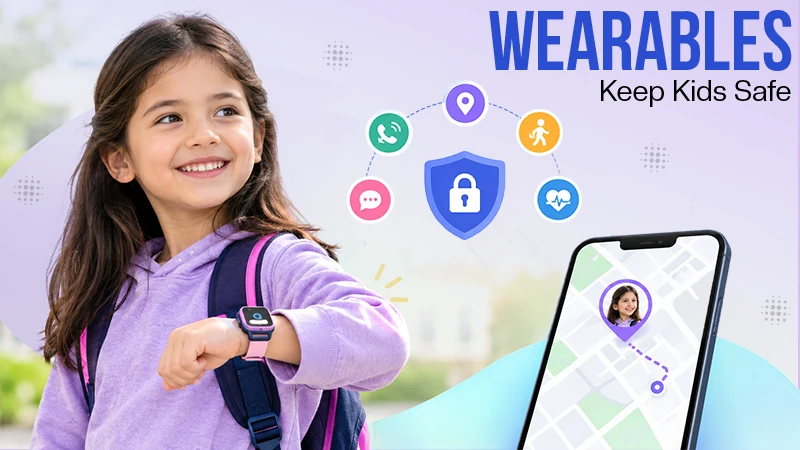
Whenever you are going outside with your kids ot th ekids re going by themselves, it’s a good idea to have a smart wearable for kids. Smart wearables can provide another level of communication and location tracking; they are there to provide your kids with outdoor safety.
The best things they have to offer are: location sharing, approved contacts, emergency communication, battery reliability, and privacy controls.
With wearables, children can enjoy the outdoors, and parents can be worry-free. Read this blog to learn more.
A child who is walking a little ahead, riding a bike, or going to a larger area may not always stay within arm’s reach. A wearable has another way for a parent or caregiver to check in without giving a younger child free use of a smartphone.
GPS-enabled watches may connect location services with calling, messaging, geofencing, or SOS functions. However, features vary between devices, and location information can get less useful when battery power, cellular connectivity, or positioning needs are poor. Families looking into how location technology can support child safety can also learn more about GPS technology for keeping children safe.
Families planning a trip can also look at different Places to visit in Central Alberta when picking a place that fits the children’s ages, abilities, and experience levels.
More parts do not automatically make a wearable more helpful. For outdoor family trips, it is better to focus on things that fix an exact safety or communication problem.
| Feature | Why it matters outdoors | What to check |
|---|---|---|
| GPS/location sharing | Helps a caregiver see the device’s reported position | Update frequency, timestamp, and connectivity |
| SOS or emergency calling | Gives the child a simple way to request help | Who receives the alert and how it operates |
| Approved contacts | Limits communication to people selected by the family | Incoming and outgoing contact controls |
| Geofencing | Can notify a caregiver when a child leaves a defined area | Alert delays and customization |
| Battery life | A dead device cannot provide useful updates | Real-world battery performance |
| Water resistance | Helpful during rain and wet outdoor activities | Manufacturer’s actual rating and limitations |
| Focus or school mode | Reduces unnecessary notifications | Whether safety functions remain available |
| Privacy controls | Helps protect location and personal information | Sharing, retention, permissions, and security |
Privacy needs special attention. Consumer testing has found differences in child-focused trackers and smartwatches in places such as security, authentication, encryption, and data collection, so privacy should be considered with hardware features when picking a device.
One common mistake is treating the location on a parent’s phone as a current position. It is not. Location accuracy and update frequency can differ based on the device, place, cellular connection, battery level, and positioning technology.
A wearable may decide its position but still be unable to send a current location if its needed connection is unavailable. Parents should check the timestamp related to a location rather than thinking that every map marker means the child’s exact position at that time.
This is very important outside. Alberta’s public-land rules advise picking a place right to the group’s abilities, understanding the place and needs, carrying the right things, and making sure someone knows the trip details.
A wearable is most useful when it’s a part of a simple family routine. Before leaving, charge the device, check that location sharing works, confirm emergency contacts, and make sure the child knows the feature they may need to use.
Children also have a few simple rules that they can learn without always looking at a screen:
Trail manners count as well. Shared recreational paths can have pedestrians, cyclists, and other users, so children should know that they need to stay aware of their surroundings rather than focusing on the wearable.
A GPS watch created for children can collect more than a place point. Relying on the device, data may include location history, contacts, messages, voice information, device identifiers, or other activity data.
The Office of the Privacy Commissioner of Canada advises checking privacy data before buying a wearable, using strong privacy settings and passwords, keeping software updated, and understanding what data is collected, shared, and kept. Families can check its privacy guidance for wearable devices before picking a device.
Parents can use these principles in useful ways:
The goal is not to collect as much data as possible. It is to use only the data that offers real help while limiting unnecessary exposure.
Families do not always need a full smartwatch. A simpler tracker may be good when the main job is location understanding, while a connected watch can make more sense when contact is also important.
| Option | Best suited to | Advantages | Limitations |
|---|---|---|---|
| Bluetooth tracker | Finding belongings or short-range locating | Simple and generally easy to maintain | Not designed for full outdoor communication |
| GPS tracker | Location-focused use | May offer location sharing and geofencing | May require a service plan and connectivity |
| Kids smartwatch | Location plus communication | Can combine GPS, calls, messages, and other features | More functions can mean greater battery use and data collection |
| Smartphone with location sharing | Older children already carrying phones | Familiar device with broader capabilities | More distractions and settings to manage |
A device should be picked according to the child’s age, independence, the type of outing, expected connectivity, and the clear safety issue the family is trying to solve.
The best time to find that a wearable does not work is before getting to the trailhead. Families using a new watch should first know its basic roles and complete the initial setup before relying on it outdoors. A kid’s smartwatch setup guide can help parents understand the types of settings that may need to be changed.
1. Charge and Test It
Fully charge the device and do a test call or location check before leaving. Many location updates, calls, and connected functions can use more battery than normal standby function.
2. Check Connectivity
Confirm that the device’s needed cellular service is available in the area you want to visit. GPS power alone does not confirm that the watch can send its location to another person.
3. Review Contacts
Check the approved contact list and remove anyone who no longer needs access. A child’s wearable should not become an unrestricted communication channel.
4. Practise the Emergency Function
Show the child just what the SOS feature does and when it should be used. They should know who gets the signal and what is going to happen after activation.
5. Make a Backup Plan
Carry the right things for the place and needs, like water, food, suitable clothing, and first-aid supplies. Alberta’s public-land guidance also advises making sure an emergency contact knows the important trip details.
The biggest mistake is depending on the wearable instead of teaching the child basic safety skills. A tracker cannot stop a fall, poor weather, breaking from the group, or an unsafe interaction with another person.
Another mistake is failing to explain location tracking to the child. Children should know that the tool is being used as part of family safety and know which adults can have their location.
Families should also avoid thinking that every trail has good mobile connections. Some outdoor areas can have limited reception, which is why an emergency plan stays important even when a child has connected technology.
The personal safety guidance for children also stresses talking about personal safety, finding trusted adults, and practising what to do during emergency situations.
Smart wearables can make outdoor family trips easier to handle, mainly as children get more independent. GPS location, approved contacts, and emergency communication can give useful data, but they work best as one layer of a broader safety plan.
Before going out, choose a path that fits the family’s abilities, check current conditions, charge and test the wearable, check privacy settings, and make sure the child knows what to do if the group becomes separated. Families planning their next trip can also look for Places to visit in Central Alberta and choose an exercise that suits the children’s experience level and the family’s safety plan.
GPS positioning and communication are separate functions. A watch may be able to determine its position while still being unable to send that position to a parent if the required cellular or internet connection is unavailable.
They can be useful when configured carefully, but safety depends on more than the hardware. Parents should consider location-sharing controls, account security, data collection, battery reliability, and how the tracking arrangement is explained to the child.
Accuracy varies according to the device, satellite visibility, surrounding conditions, connectivity, and other positioning technologies. Parents should also check the timestamp of a reported location instead of assuming that every map marker represents the child’s exact current position.
It can be useful when the device addresses a specific communication or location need. It should still be combined with adult supervision, suitable trail planning, weather preparation, and an emergency plan.
Treat the loss of connection as a reason to use the family’s backup safety plan. Stay with the group, use available maps and communication methods, and do not assume that the last reported location is the child’s current position.
Limit location access to trusted caregivers, use strong account security, review application permissions, remove unnecessary sharing, and understand the manufacturer’s data-retention practices. The privacy guidance for wearable devices provides additional recommendations for reviewing these settings.