Ans: Wix provides ready-to-use templates and suggests changes to your document, so that it matches perfectly with any job or opportunity.

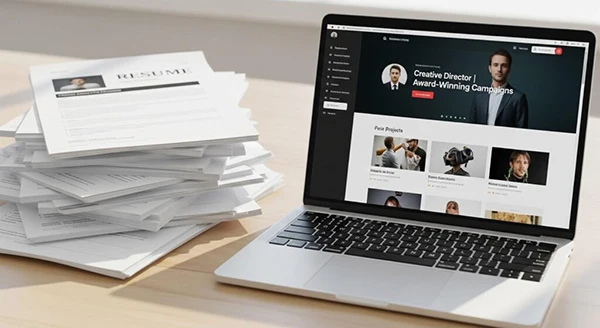
Sending out resumes can feel like tossing them into a black hole. You are aware of your talent, but a black-and-white document definitely doesn’t display the whole picture.
That is where a portfolio website comes in, giving recruiters a real look at what you are capable of. It allows you to build the perfect resume, ATS optimized, and curated for every job post, so that you never miss out on future opportunities and secure your career early.
This guide will walk through building a portfolio that gets you hired faster, and how to pick your best projects, and design a layout that keeps hiring managers clicking.
Key Takeaways
- Stop relying solely on a basic resume; provide visual proof of your abilities
- Curate only your strongest, most relevant projects to prevent overwhelming the reader
- Explain the problem, your exact process, and the results for every project
- Keep your design clean and incredibly easy to navigate
- Update your work regularly to reflect your latest professional wins
A standard resume forces you to cram years of hard work into tiny, restrictive bullet points. It completely strips away the context of your achievements. A portfolio website, on the other hand, lets your work speak for itself.
You can even try building one for free with Wix’s easy and intuitive builder. When a hiring manager clicks your link, they’ll instantly step into your professional universe.
Visual evidence completely transforms how people evaluate your potential. If you design graphics, write copy, or manage complex projects, reading about your past duties is incredibly boring.
Seeing the actual ad campaigns, reading the published articles, or viewing the project roadmaps builds instant trust. You remove the guesswork from their hiring decision entirely.
This visual collection also proves your baseline professional competence. It shows you care enough about your career to present yourself beautifully.
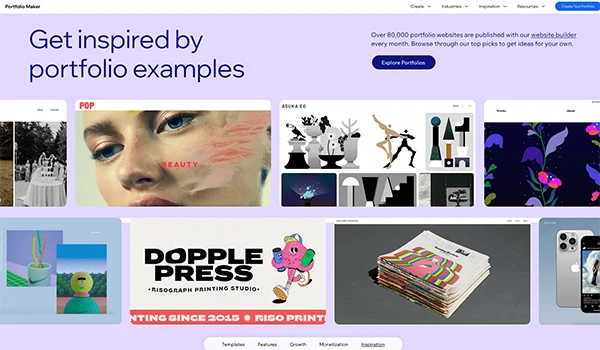
The biggest and most common mistake job seekers make is uploading every project they have ever touched in the document. You do not want to overwhelm a busy recruiter with mediocre examples from college.
You require a curated, tight, and highly impactful collection of your absolute best work. Remember, quality always trumps quantity when you want to gain someone’s attention quickly.
So, for instance, if you wish to showcase your beautiful photos and edits, a photography portfolio becomes a great choice to refine album categories, using one of the many portfolio templates Wix offers.
Aim for three to six stellar projects. Choose examples that directly relate to the specific jobs you want next. If you want to transition from social media management to long-form copywriting, feature your articles heavily. Leave the Instagram graphics at the bottom of the page or remove them entirely. Tailor your collection to mirror the exact role you are chasing.
If you take responsibility for multiple things professionally, organize your work into clear, distinct categories. Create a separate section for branding, another for website design, and a third for photography.
This clear organization helps a recruiter jump directly to the exact type of work they care about most.
Use big, beautiful thumbnail images for each project. A strong cover photo attracts the reader to click and explore deeper. Make sure these thumbnails look cohesive when arranged next to each other on your main page.
Dropping a pretty photo onto a webpage is never enough. Hiring managers need to know about the process and how you arrived at that final, polished result. They look to understand the strategic thought behind the whole process.
To do this, you need to write a compelling case study for every single project you feature.
Start by explaining the initial problem or goal. What did the client ask you to do? Next, describe your specific role in the project. If you worked on a large team, be incredibly honest about which parts you handled personally. Transparency builds massive credibility.
Then, guide the reader through the actual process. Share early drafts or the research data you gathered along the way. Seeing how you implement and improve an idea proves that you are coachable and resilient.
It shows you know how to take raw feedback and turn it into something great.
Your case study must end with measurable outcomes. Did your new email template increase open rates by twenty percent? Did your event planning save the company five thousand dollars? Attach real numbers to your work whenever possible.
If you do not have hard data, share qualitative results. Include a highlighted quote from your client or a message from your former manager praising the your creation. Proving that your work actually made a positive impact, making you an incredibly attractive hire.
Your amazing case studies will not help you if the recruiter cannot figure out how to navigate your pages. User experience matters immensely. You want to create a smooth, effortless path from your homepage directly to your contact form. Any friction along the way will cause a busy hiring manager to close the tab and move on to the next applicant.
Keep your navigation menu incredibly simple. You only need a few pages: Work, About, and Contact. Avoid clever, confusing names for these pages. If an agency wants to hire top remote IT and tech talent, they scan dozens of applications an hour. They do not have time to guess what “My Brain Waves” means. Just call it “My Work” and let them get straight to the goods.
Use a clean, readable font and leave plenty of white space around your text. Huge walls of dense text exhaust the eyes. Break your case studies down into short, punchy paragraphs. Use bold subheadings so recruiters can easily skim the page and find the exact information they need fast.
Your contact page is the ultimate finish line. If someone makes it there, they are actively considering calling you for an interview. Make reaching out the easiest thing they do all day.
Include a very short contact form asking only for their name, email, and a brief message. Provide your direct email address, just in case they prefer their own inbox. Add links to your professional social handles so they can explore your industry connections.
Fun Fact
Including a few distinct “fun facts” about yourself helps employers view you as a real person they actually want to work with.
Before you share your portfolio, you’ll want to optimize it for the real world. Here are a few additions every freelancer should make to their portfolio to make it shine.
First, remember that over half of all internet traffic happens on mobile phones, so your site must look amazing on a small screen. Verify your layout on your phone to make sure the text is readable and the buttons are easy to tap.
You also want to perfect the personal side of your site. Your “About” page is a great opportunity to build a human connection. Share a short story about why you love what you do, and mention a hobby or a passion project. Companies hire people, not robots, so showing a little personality proves you’ll be a great addition to their team.
Even if a massive corporation relies heavily on recruitment process outsourcing to handle its initial applicant screening, your link eventually lands right on a hiring manager’s desk. That final decision-maker wants to see a confident, polished professional.
Make a habit of updating your site every few months. As you complete new projects and learn new strategies, swap out older work for your latest wins. A fresh, current portfolio shows employers that you are actively growing and constantly improving your craft.
You have incredible talent to offer the world. Put it on display beautifully, send those applications out with total confidence, and get ready for the interview requests to start rolling in.
Ans: Wix provides ready-to-use templates and suggests changes to your document, so that it matches perfectly with any job or opportunity.
Ans: Be sure to include your email address, so contacting you becomes simpler and direct, helping you keep track of updates easily.
Ans: No, only include the projects that showcase your best work. Including everything in there just makes it look untidy and difficult for recruiters to identify the things they want to actually see.
Ans: To categorize your portfolio, create a separate section for branding, another for website design, and a third for photography. This organization helps a recruiter jump directly to the exact type of work they care about most.