Ans: In most of the places, it is set to 13, but parental consent is required if you are below 18. Enforcement is typically a self-declared birth date, so treat the stated age as a policy rather than a barrier.

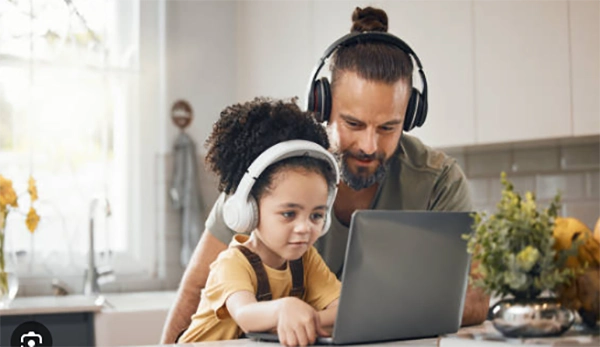
Children of any age, even from the age of 8-9 years old, can simply play or make a song with full production, vocals, and a chorus that actually makes sense. They can easily make it with the help of AI by just typing a few sentences.
Your first reaction might be ignoring him or listening to his song and being amazed. But one thing that you should take care to think about is: What did they type to get this song, where did it go, and who else can hear it?
These tools are very useful and might also be fun for the kids using them. The only problem is the data they collect and host public feeds, and they were also not designed with children in mind.
KEY TAKEAWAYS
- The minimum age criteria for most of the AI tools is 13 years, and if you are below 18 and using it, you also need the consent of your parents, but the drawback is that no one verifies it.
- The terms and services that you tick before using the tool grant the apps, by your consent, permission to use your data, and your data can be used by those particular tools to train their models.
- The biggest risk while uploading your voice is the risk of misuse of personal information under the amended COPPA rule.
- Public community feeds are by default selected on the public platforms, and you usually don’t have to go and particularly select the opt-in option.
The functioning of this tool is way simpler than you think it is after seeing the output. The steps to generate a track are: Type the description, select the mood and the genre, and the model that is trained to take the command and generate the audio does the work smoothly.

Also, the way to get the best music is to pick the type you want from instrumentals and vocals. Also, set the length between 30 seconds and 3 minutes, which is the standard time. Give the command to generate a few variations after every run so that you can choose the best one from them.
That last detail matters more than it sounds. A tool that generates music often generates other things too, and the account your child creates covers all of it.
Here’s what the terms actually say, using Suno as the example since it’s the one kids name most often.
You need to be at least 13. If you’re under 18, you may only use it with the express consent of a parent or guardian. In EU countries, where the age of data-processing consent runs anywhere from 13 to 16, the local age applies instead.
Now the honest part: that consent is usually a checkbox. Nobody emails you. A twelve-year-old who types a different birth year is through in seconds, which is why the practical minimum age on most of these platforms is however old your child says they are.
After reading the licensing clause once, you will always be reading it differently.
The most important things that you should always remember while using these AI tools are that their terms grant them the right to use your data worldwide that too royalty free to use, modify and reproduce, adapt, and translate whenever and wherever they want to. And also, it doesn’t require any third-party permission to submit all the data and train their AI models.
For a text prompt, fine. For an uploaded audio clip of your child singing, that’s a different proposition entirely.
WORTH KNOWING
The FTC’s amended COPPA Rule — which every covered operator has had to comply with since April 2026 — expanded the definition of personal information to explicitly include biometric identifiers such as voice recordings. A child’s uploaded vocal isn’t just audio to a regulator; it’s personal data.
Not the ones you’d guess. The music itself is rarely the problem.
Music is rarely the only thing they’re generating, either. A companion guide on this site covers the wider set of AI creative tools kids reach for — image generators, video editors, custom background soundtracks for their own clips — and the boundaries that hold across all of them.
Five minutes with the platform, before your child gets it.
| Things to Check | What should you do |
|---|---|
| Minimum age required | 13+ is the basic age required to enter, and if you are below 18, you need the consent of your parents. |
| Account ownership | Never let the kids use their own Gmail; use your own credentials to log in. |
| Default sharing | Keep the newly generated tracks private on creation and never let the default setting go to public. |
| Voice upload | Turn this setting off or agree on the option of the off-limits. |
| Training opt-out | This option is offered by some of the applications. You just have to look for it in the settings of the tool. |
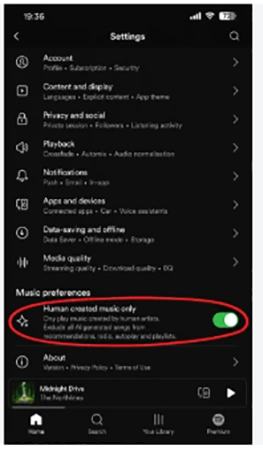
Two habits beat any setting. Sit through the first few sessions — not supervising exactly, just present. And agree upfront that finished tracks get shown to you before they go anywhere.
The AI music app is not dangerous, but the apps that have the feature to do unmoderated chat are very dangerous. In a music app, there is not a single problem apart from the child’s voice that is sitting there and going where anyone can access it without a doubt. The problem is that the voice, which was made for one person, goes public.
Both of the things that are possible can be avoided by just following a few simple steps. The steps are: turn your uploads off, use your own account rather than your kids’, check the sharing default, and set it to no one. This will help keep your kids’ voice secure and will not allow them to get their voice on the public platform.
Ans: In most of the places, it is set to 13, but parental consent is required if you are below 18. Enforcement is typically a self-declared birth date, so treat the stated age as a policy rather than a barrier.
Ans: On most of the platforms, yes — community feeds are a standard feature. Check whether new tracks default to public before the first one is made.
Ans: No, you should avoid that completely if possible. Voice recordings are personal data under the amended COPPA Rule, and platform terms often claim a perpetual licence over anything submitted.
Ans: Very few. The practical control is owning the account yourself and keeping generation on a shared device rather than a bedroom one.