No, this is one of the biggest advantages. You just need to have a good image and the will to turn it into something better.

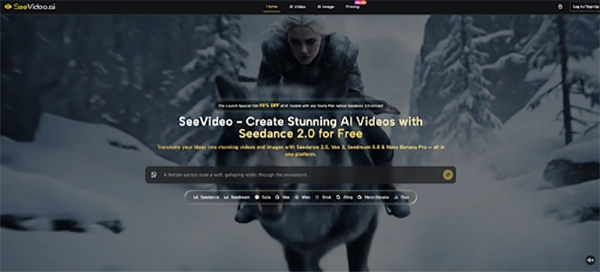
Do you know, one can now convert a photo that holds a moment into one with movement and rhythm or even training content? All with Seedance 2.0. It allows users to turn any image into a dynamic character video.
Sounds unreal, right? But it is actually that simple and interesting. No use of advanced apps, various platforms or some train course. Simply log in and start creating.
This has helped creators to build better content and users to turn the moment into a more realistic memory. Read more to learn how one can actually transform static images into dynamic dance content with Seedance 2.0.
Key Takeaways
- With the help of Seedance 2.0, static images can now be transformed into engaging video content.
- The quality of the input images directly affects the final output. Better image leads to better quality.
- AI tools are shifting content creation from more effort-heavy processes to idea-driven ones.
Maintaining a consistent facial structure during high-intensity movement is one of the most difficult tasks for any motion synthesis engine. Many tools break down from “glitching” where the identity of the central thing alters as they turn or jump.
Within this system, the focus has switched toward advanced feature locking, ensuring that the eyes, nose, and mouth remain clear even during rapid 180-degree rotations. This technical stability is what differentiates professional-grade outputs from basic experimental filters.
In my testing, the consistency of the character’s clothing and background also plays a key role in the overall performance. While old methods might blur the environment when a character moves, modern AI plans attempt to separate the subject from the background.
This distinction ensures that the dance moves are fluid while the building concepts remain same and realistic. However, it is important to note that results often rely on the clarity of the initial prompt and the lighting of the source image.
The request for short-form video content has expanded, placing intense pressure on creators to produce high-quality visuals daily. Motion mixing provides a response by allowing for the rapid prototyping of dance trends and character illustrations.
Instead of recording multiple takes, a single finished image can serve as the base for an entire series of rhythmic dances. This success allows creators to focus more on the symbolic side of storytelling rather than the logistical challenges of a physical shoot.
To bring about realistic dance movements, the system must first define the “joints” of the subject within the uploaded image. This skeletal illustration allows the AI to understand how a human body should naturally bend and stretch.
By adding a pre-defined motion file to this digital skeleton, the software adjusts the pixels’ displacement over time. My observations tell me that the more specific the silhouette in the original photo, the more accurate the resulting dance steps will be, particularly in complex genres like hip-hop or shuffle.
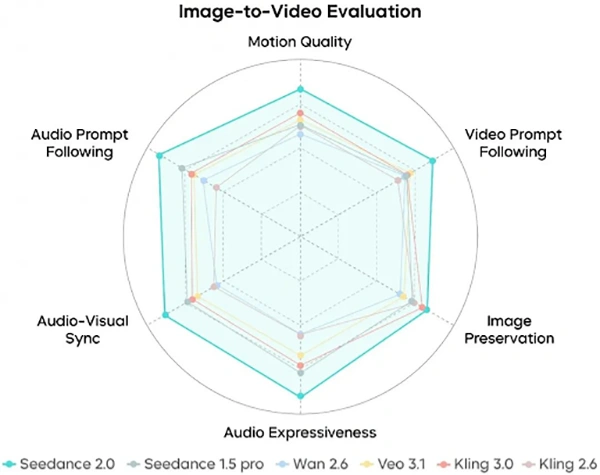
Beyond simple movement, the implementation of audio-driven animation adds a layer of depth to the final video. The system pairs the character’s rhythm with the beats of the music, creating a cohesive audiovisual experience.
This level of synchronization was once the domain of high-end VFX houses, but it is now accessible through seamless cloud-based interfaces. The ability to handle high-definition 1080p output further ensures that the content is ideal for professional broadcasting and high-resolution displays.
| Feature Category | Standard Animation | Advanced Motion Synthesis |
| Source Requirement | Multiple frames or 3D models | Single static image |
| Identity Retention | High risk of facial distortion | Enhanced facial feature locking |
| Motion Complexity | Simple linear movements | Complex dance and rhythmic patterns |
| Processing Time | Days or weeks of manual work | Minutes of automated processing |
| Skill Requirement | Professional VFX training | Basic prompt and image selection |
While the progress in AI video is significant, it is not without its hurdles. Users should be aware that highly complex backgrounds or overlapping limbs in the source image can sometimes confuse the motion algorithms.
Occasionally, a user might need to attempt multiple runs or refine their text prompts to achieve the perfect result. This iterative process is a standard part of working with generative models, and patience is often paid off with a much smoother and more lifelike final product.
The move toward 1080p as a standard output resolution is a major milestone for AI video tools. High-definition output allows for greater detail in skin textures and fabric movements, which are essential for creating an interactive viewing experience.
When viewed on mobile devices, these videos appear very crisp, often indistinguishable from recorded footage at first glance. This clarity is particularly important for brands and influencers who require a high level of aesthetic refinement in their digital presence.
To begin the process of animating a static character, the workflow is designed to be straightforward and logical. Following these official steps ensures the highest chance of a successful and visually engaging output.
Select a high-resolution image that has a clear subject. For the best results, ensure the person or character is facing the camera with their entire body visible. Clear lighting and a non-cluttered background will help the AI carefully map the skeletal structure of the subject during the initial analysis phase.
Browse through the available library of motion presets. These templates range from viral social media dances to professional choreography. The system will preview the motion path, allowing you to visualize how your character will move before the actual calculation begins.
Initiate the AI rendering process, which typically takes a few minutes depending on the complexity of the movement. Once the video is generated, review the quality of the character.
If the movement feels too strong or the face shifts, you can adjust the intensity parameters and regenerate the clip for a more polished look.
For professional designers and marketers, adding these tools into the creative pipeline can significantly reduce production costs. By using a single asset to generate dozens of different video variations, a brand can test which dance styles or visual aesthetics resonate most with their target demographic.
This data-driven approach to content creation is becoming the standard in an industry that moves as fast as the algorithms that power it.
The potential for this technology extends beyond simple entertainment. It offers a new way for illustrators to see their characters come to life and for photographers to add a new dimension to their portfolios.
As the models continue to evolve, the distinction between filmed reality and generated motion will continue to blur, opening up a world where the only limit to content creation is the creator’s imagination.
How we used to create content a decade ago has changed completely. Tools like Seedance 2.0 are helping to break the traditional barriers and make it possible for every user to turn a simple image into a dynamic and engaging one.
The reason this stands out it allows one to be limitless in both skills and resources – helping creators to focus just on ideas and not on complex tools.
In the end, it is a great tool for both beginners and experts to take advantage of modern tools and stand out.
No, this is one of the biggest advantages. You just need to have a good image and the will to turn it into something better.
Yes, there are various options as well as templates to select from. This makes the dance styles more structured and perfect for social media platforms.
Yes, brands can take advantage of it to use in marketing, ad creation and other engaging content creation.