Phone location pins are roughly accurate to about 16 feet outdoors and about 53 feet in indoor settings; that’s why it’s important to treat this location pin as an estimated place rather than confirmed coordinates.



Assumptions are where most parents go wrong.
For example, imagine an app shows your daughter’s location at the mall, but your daughter says she was at Priya’s house.
Most parents assume their child is lying, but before you send that text, one tiny detail that most users miss is that a phone indoors may misreport its position by up to fifty feet. So the mall where your daughter is reported is just the building next door.
This is exactly what the loophole created by real-time tracking is. It makes sure you know what the data is but never gives the context.
So this is how you should read the information inside a dashboard and what to do once you have interpreted it.
Location pins on our digital services like maps or cab booking apps are far less precise than what is shown.
It is also stated by GPS.gov that a GPS-enabled phone is only accurate to within sixteen feet, that too under an open sky. This means that when the phone’s location starts to shift from an open space to more packed areas with tons of buildings and trees, the accuracy of its location also decreases.
The accuracy of a phone’s location can have errors up to 16 feet in an open sky, but in a highly busy area, the intensity of errors in a phone’s location increases to 54 feet.
Fifty feet is a neighboring shop. It’s the apartment above. It’s the parking lot rather than the building.
Thus, none of this specifies that tracking is useless. It just explains that location pins are rough estimations rather than showing exact coordinates.
Most dashboard signs show data without ever relaying what it means. The balance while using such apps is to know what the data means and not just what you want to see it as.
| What the dashboard shows | What it might mean | What to check before acting |
|---|---|---|
| Different location from what you were informed of | An error or a changed plan | Whether the pin has moved since, and how far off it typically sits |
| A sharp jump in screen time | Illness, school holidays, a new game, or something being avoided | Whether this is one day or a three-week trend |
| A new app appearing overnight | Curiosity or the friend group using this as the primary mode of communication. | What is the app used for |
| Phone off during school hours | School policy, a flat battery, or deliberate avoidance | The school’s own device rules first |
Notice that the third column is a question for every single parameter rather than a conclusion. This shows how it is extremely necessary not to believe what the app displays entirely.
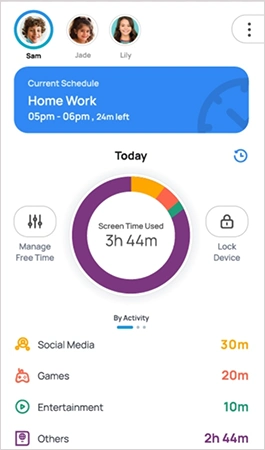
A single day of unusual time durations or activities will never tell you anything useful about your kid’s routine or habits, but the same changes observed continuously for a longer time period give you exactly the information you need.
If you come home late one day, it can be due to a sudden weather change, a new bus route, or even a conversation with a colleague that ran longer than expected, but if this same forty-minute delay occurs every Thursday, then that is a routine you know nothing about. It is usually recommended to understand this new routine and why it happened before you try to change it.
This is the same logic that is applied to your kid’s screen time. A surge inscreen timee by four hours for a single day can mean the child was sick or was travelling to a relative’s house on a long bus journey. However, the four hours of constant increase noticed over the duration of three weeks can be concerning and might need your immediate attention.
Thus, it is advised to set your dashboard to show you weekly trends rather than daily alerts because daily alerts only train you to react, but weekly trends train you to notice.
The majority of parents treat data as a threat detector, but it’s not.
The dashboard of your parental control app displays only app categories with figures stitched onto it; it never talks about the intent behind spending a significant amount of time on a particular task or app. Two hours extra in an app or website could mean a design app created to lure children in and keep them engaged, or it could mean a fourteen-year-old quietly building something.
Both of these readings depict the same data; however, both mean things that are completely different from each other. One signifies that a limit for screen time has been reached, while the other ends in asking what they’re working on.
That second conversation is where free creative tools tend to surface, whether it’s a video editor for a channel nobody’s told you about yet or a free logo generator for a school club that needs a banner by Friday. Usage data is often the first place a parent sees an interest forming, weeks before it gets mentioned at dinner.
Here’s the opinion, and it’s held firmly. Tracking a teenager who doesn’t know they’re tracked buys you a few months of information and costs you the thing you actually wanted.
Industry Insight
Pew Research Center’s 2020 survey of US parents found that among those with a child aged eleven or under, 33% tracked location through GPS apps or software, while 49% checked call and text records. Technical monitoring has always been the less common approach. (Source: Pew Research Center)
The reason isn’t squeamishness. Discovery is close to certain, and what a teenager learns from discovery is that you’d rather verify than ask.
Announced tracking works differently. The child knows the geofence exists, knows what triggers an alert, and knows the data gets discussed rather than stored up. It buys less raw information and considerably more of what you were after.
Data can actually be called accurate and not just an estimation when it not only displays numbers, but also explains what the numbers actually depict.
Hence, parents should only trust data as the exact point of proof when that data has earned its place as one because parents who ask “how was Priya’s?” will always have better chances at knowing the truth than the ones who start the entire conversation with”the app says you were at the mall”
So treat every alert as a prompt. Check the pattern before the incident. And when the pin and the story disagree, remember that fifty feet of error and a teenager who took a shortcut through the food court produce identical data.
Phone location pins are roughly accurate to about 16 feet outdoors and about 53 feet in indoor settings; that’s why it’s important to treat this location pin as an estimated place rather than confirmed coordinates.
Yes, you should always tell your child about the tracking since the fallout that happens after they find out on their own isn’t usually worth the information that you found out about. Moreover, a tracking app is installed for the safety of your child and not to control them or see where they were.
Switch from instant alerts to weekly summaries. Patterns carry far more meaning than isolated events, and constant notifications tend to produce overreaction.
It’s generally simpler with younger kids, who tend to accept it as normal. The consent conversation matters more as they approach adolescence.