Live chat works if someone is always online, which rarely happens in a small team. A chatbot covers nights, weekends, and busy hours so visitors get a reply when they’re ready to buy.


Most website visitors don’t leave because they aren’t interested. They leave because no one replies fast enough. It takes less than a minute. Imagine it’s 11 p.m. A potential customer lands on your website with a quick question in their mind, and finds nobody around to answer. They pause, scroll for a moment, then close the tab. By morning, that same customer has already bought from someone else.
If that scene makes you wince, you’re not alone. This is exactly how most small business owners lose leads this way every week. Not because their product isn’t good, but because no one is available at the exact moment a customer is ready to talk. The reality is that most visitors won’t wait; they just move on to the next option.
The good news? You no longer need a support team to fix it. A simple chat tool on your website can answer questions, capture leads, and book appointments while you sleep. Let’s walk through the options worth your time.
KEY TAKEAWAYS
- Small businesses lose leads every day simply because no one is available to reply at the right moment.
- Chatbots help businesses respond instantly and stay available to customers 24/7.
- The best chatbot tools are easy to set up, learn from your own content, and fit your budget.
- Choose the right chatbot based on your specific goal, such as leads, support, or sales.
Today’s customers don’t wait. Not for emails, not for callbacks, and definitely not for we’ll get back to you soon. People who land on your site want answers in seconds, not hours. If they don’t get them, they move on. For small businesses, that delay often means one thing: a lost customer who never comes back. That’s a brutal reality for solo founders and small teams who can’t sit at a screen all day.
Hiring a full support crew isn’t realistic for most small businesses either. An automated chat tool gives you something close to round-the-clock coverage for a fraction of the cost. It replies instantly, captures emails before visitors leave, handles repetitive FAQs, and frees you up to actually run your business.
Fun Fact – Companies that respond within 5 minutes are 21x more likely to qualify a lead compared to waiting 30 minutes. (InsideSales)
Here is what you should look for before finalizing anyone:
Look for something a non-tech owner can install. If it takes more than an afternoon to set up, skip it. No-code builders and one-click website embeds matter more than fancy features you’ll never touch. A clunky setup also hurts your brand perception, since visitors notice when something feels off.
The tool should learn from your website, FAQs, or help docs. Generic canned replies feel robotic and frustrate visitors fast.
Free tiers and flat monthly plans usually beat per-conversation pricing for small businesses, especially when traffic spikes are unpredictable.
Decide whether you need just website chat or also WhatsApp, Messenger, and Instagram support in one inbox.
You can explore the following chatbots, listed based on their key features.
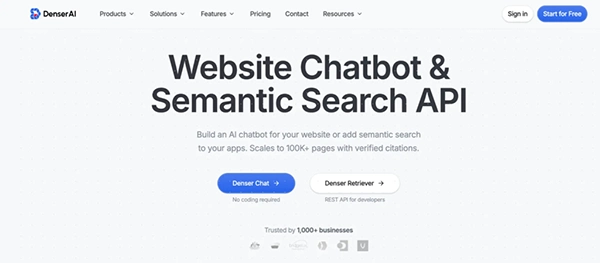
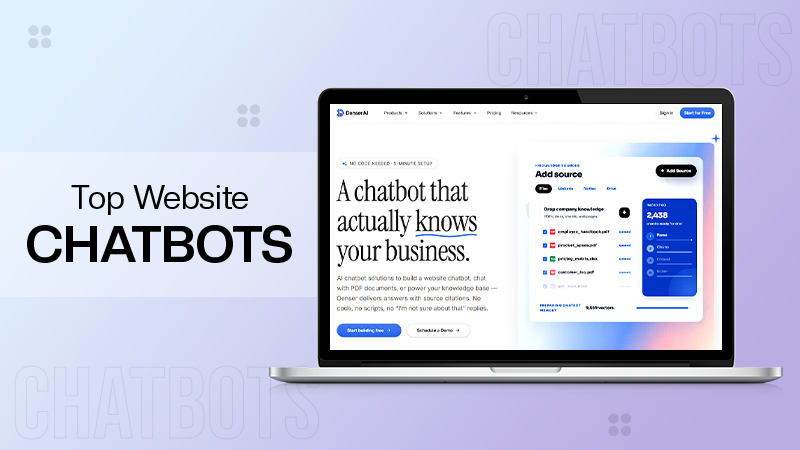
If you want an AI chatbot trained on your own website with zero coding, Denser Chat is hard to beat. You drop in a URL, and within minutes, it builds a bot that pulls answers straight from your real content. That means accurate replies, not generic fluff that makes visitors roll their eyes.
The setup is genuinely beginner-friendly, so you don’t need a developer or a long onboarding call to get started. The free plan is usable for small sites, the interface is clean, and the bot handles follow-up questions in a way that feels natural rather than scripted. It’s regularly listed among the best website chatbot tools for owners who want AI accuracy without setup headaches. Great pick for service businesses, SaaS startups, coaches, and ecommerce stores with decent website content to train it on.
A friendly mix of live chat and AI bots in one tidy package. Strong ecommerce integrations with Shopify and WooCommerce mean it can recommend products, recover abandoned carts, and answer order questions without you lifting a finger.
The visual flow builder is easy to use, even if you’ve never built a bot before. Good fit if you want both human and bot coverage in one tool, and the free plan is generous enough to test properly. The trade-off? Advanced AI features sit behind higher pricing tiers.
A powerful AI agent that shines when you already have a solid knowledge base. Replies feel sharp, professional, and surprisingly human, which is why bigger SaaS brands lean on it heavily.
Fin can resolve a large chunk of repetitive tickets on its own, freeing your time for higher-value work. Be honest with yourself, though; the pricing skews higher than most options on this list. Better suited for small businesses with steady revenue and real support volume, not solo founders just starting.
If you already use HubSpot CRM, this is a no-brainer. The free version handles basic lead routing, meeting booking, and FAQ replies, and everything syncs neatly with your existing contacts. That contact sync is the real win, since every chat becomes useful sales data instead of a one-off conversation. The bot itself is more rule-based than deeply conversational, but for booking demos, qualifying leads, and answering simple questions, it gets the job done without costing you a dime.
A multichannel inbox that pulls website chat, email, WhatsApp messages, Messenger, and Instagram DMs into one place. Pricing is simple and predictable, which small business owners appreciate after dealing with confusing usage-based tools.
Service-based businesses like agencies, consultants, and clinics tend to love it because they juggle multiple channels and don’t want to bounce between five different apps all day. The interface is modern, the mobile app is solid, and the basic chatbot features are good enough for most small teams.
Drag-and-drop flows with a big template library that covers common use cases like lead generation, appointment booking, and customer support.
No coding required, and you can launch a working bot in about an hour if you stick to a template. It’s better for rule-based flows than deep AI conversations, so think of it as a smart decision tree. For predictable customer journeys like “What are your hours?” or “Where’s my order?”, it’s reliable, fast, and cheap to run.
Conversational landing pages and lead-gen flows that feel more like a friendly chat than a boring form. Excellent for booking calls, running quizzes, qualifying leads, and collecting structured info without scaring people off with twelve form fields.
The visual builder is one of the prettiest in the category, and the bots look great on both desktop and mobile. Marketers love Landbot for campaign-specific pages, while small business owners use it to turn cold landing pages into real conversations.
Built specifically to replace boring forms with chat-style flows that actually feel human. Conversion rates often climb noticeably when you switch from a static form to a Tars bot, especially on paid ad landing pages where every percentage point matters.
The templates are industry-specific, covering real estate, healthcare, and local services, so you don’t start from scratch. Worth a look if your main goal is squeezing more leads out of the traffic you already have.
A solid pick if you want AI automation and human support working together without a complicated setup. ProProfs Chat comes with ready-to-use templates for lead generation, appointment booking, and customer support to get you running fast, and you can train the bot on your own website or help center content so answers stay accurate and on-brand.
What makes it work day-to-day is the reporting layer underneath. AI bot performance analytics show you exactly where the bot is winning and where it needs work. Sentiment analysis tracks how customers feel across conversations so you can catch friction before it becomes a bigger problem. Real-time visitor tracking and smart routing keep your agents on top of every conversation without the chaos.
Good fit for businesses that want round-the-clock coverage without round-the-clock staffing. The balance between automation and human handoff feels natural rather than forced.
Start with one job. Pick either FAQ deflection or lead capture, get that working well, then expand. Trying to automate everything on day one is a fast track to a clunky bot nobody enjoys using.
Feed the bot real questions from your inbox during the first week. Your support emails are a goldmine of training data, and your bot will sound much more like you if it’s trained on actual customer language.
Always give visitors a clear path to a human. A simple “Talk to a person” button keeps things friendly and builds trust.
The right chat tool turns a quiet website into a working storefront that never clocks out. There’s no universal winner. Match the tool to your real bottleneck. If support questions eat your day, lean toward an AI tool trained on your content. If leads slip through the cracks, pick something built for capture and routing. Pick one, use the free tier, and give yourself two weeks of honest testing.
Live chat works if someone is always online, which rarely happens in a small team. A chatbot covers nights, weekends, and busy hours so visitors get a reply when they’re ready to buy.
Most owners get started on a free plan. Paid plans typically run between twenty and fifty dollars a month. Watch out for per-conversation pricing if your traffic is unpredictable.
Modern AI tools train on your own content, like your website, help docs, and FAQs. The better documented your business, the sharper the bot sounds.
Most no-code tools get you live in under an hour. Expect another week or two of light tweaking based on real conversations before it feels truly polished.