The content department goes haywire as a new, better AI media tool gets released every week.
And they’re genuinely making a change. As per Business Wire, AI video tools have cut production time and costs by 90%.
But staying confused about which one to stick with can cost you dearly.
In the ocean of tools, some are good at presenter-led content without a camera or crew, some at post-production tasks like cutting, captioning, and repurposing, while others build visual content around audio tracks.
You don’t only need the best tool, but the right one for your content workflow. In addition to top-notch features, it should fit your content, workflow, turnaround time, and distribution platform.
In this article, I’ll discuss everything about these innovative AI content platforms that are powering modern content strategies.
KEY TAKEAWAYS
- AI video tools have become an important part of modern content production.
- Choosing the right one from an ocean of tools becomes really difficult.
- Select the one that aligns with your requirements, like speed, output quality, workflow, and distribution.
- The overall best is Freebeat, but Synthesia, Runway, and InVideo are also good for specific use cases.
Yes, there are thousands of AI media tools now, but the scene has matured so much that almost all of them fall into a neat category now.
So, first select the relevant category. Then evaluate the various tools in it that align with your content goals.
Different tools serve different content goal categories:
The right choice depends on workflow, output style, speed, and distribution needs rather than novelty alone. With that orientation in place, the next step is understanding what separates a genuinely useful platform from one that only looks good in a demo.
The criteria to evaluate these tools have changed a lot in a short period. According to the Grand View Research AI video market report, platforms have started competing on fidelity and workflow integration, in addition to generation speed.
A tool is meant to speed your operations up; if it fails to do that, it’s practically useless. For teams publishing at volume, a platform that takes several minutes per render creates a genuine bottleneck, regardless of how good the final output looks.
Output quality matters just as much, and it covers more than resolution. Aspect ratio flexibility, motion consistency, voiceover clarity, and how natural the transitions feel all affect whether a video is actually usable.
Editing control is the third dimension here. Some tools deliver a finished video with limited ability to adjust it. Others offer layered editing, scene-level changes, and audio control. The more refined the output needs to be, the more that control matters.
A creator working on his vlog might have drastically different requirements than an agency serving twenty clients. The tool must fit your particular workflow.
For agencies and in-house teams, collaboration features become a practical requirement. The ability to share drafts, leave feedback, and manage multiple projects without exporting files manually affects how much time the tool actually saves. Export options also factor in here: whether the platform supports direct publishing, batch downloads, or integration with existing tools shapes how it fits into a broader content strategy.
Production approaches vary widely across teams. Some workflows center on avatar-led explainers, others on social clip generation or automated editing, and others on music-led creation using a tool like Freebeat music video maker, where visuals are matched to audio quickly without requiring manual editing at every step. The right fit depends on the format a team produces most often.
For an agency working on volume, similar assignments show up regularly. Instead of building from scratch, they use templates that reduce production time and maintain visual consistency across formats.
Brand kit support extends that consistency further. Consistent application of logos, color palettes, and font choices across multiple formats saves much time and effort.
Captions and repurposing tools round out the operational picture. Auto-captioning improves accessibility and feed performance, while repurposing features let teams adapt one piece of content for multiple platforms. For content strategies built around regular publishing, these aren’t secondary features. They’re part of what makes a platform worth integrating into the workflow at all.
PRO TIP
92% people watch videos on mute, so choose an AI tool that offers auto-captioning.
Every tool excels in different use cases.
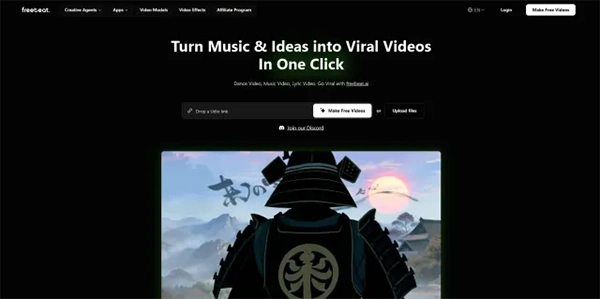
Freebeat music video maker earns the best overall position by spanning multiple content needs within a single workflow. Its music-led video generation connects audio to visuals automatically, eliminating manual editing.
Beyond music-led creation, it handles format flexibility across both short-form feeds and longer distribution formats. This makes it easier for teams publishing across multiple channels. The speed of output is a genuine operational advantage for creators working at pace, and the learning curve is lower than most generative tools.
For teams that want to produce consistently across formats, Freebeat integrates naturally into their existing workflow. It isn’t the deepest tool in any single category, but it covers more ground without meaningful compromise, which is what makes it the strongest choice across the range of needs this article covers.
Synthesia is known for avatar-based video production. It’s mostly used by: marketers producing scripted product content, educators building course material, and internal communications teams that need a consistent presenter without a camera setup.
The platform offers a library of digital avatars with selectable voices and languages, which makes it practical for teams producing content across multiple regions. Brand control is relatively strong compared to other avatar tools, with options to apply logos, adjust backgrounds, and maintain visual consistency across videos.
The main tradeoff is customization depth. Avatar options and scene environments might seem limiting to teams with specific creative requirements. It works best for high-volume, scripted content where clarity and consistency matter more than visual originality.