The emails of businesses are kept on servers in data centers, with providers usually keeping copies of the same on different disks or in different locations to avoid any chance of losing any information.

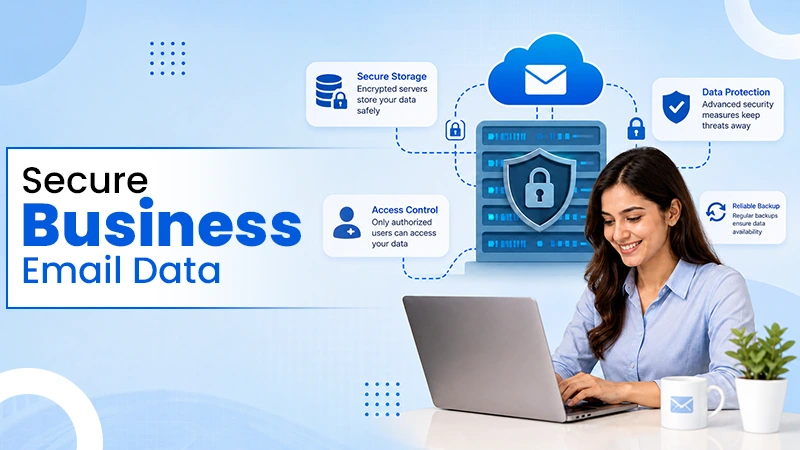
Where does your business email go when you click the send button? The impression is that the email just goes from one inbox to another, but that is far from what actually takes place.
The email could pass through several security tests, storage systems, backups, and various levels of security before it finally lands at the destination point. This is significant for business emails since emails may carry many important documents such as contracts, invoices, client information, passwords, among others.
Thus, reliable email hosting goes beyond ensuring that your inbox is accessible. There is also the issue of data security, access control, threat detection, and even data backup.
The business mailbox is stored on the servers at the data center of the service provider, and the service ensures multiple copies of each message. Replication writes each message to several disks, and often to a second facility, so the failure of a single drive or server does not lose mail. The mailbox you open in a browser or phone app is a view of that stored data, synchronized across every device you use.
Encryption at rest protects those stored copies. When the disks are encrypted, a drive pulled from a server or recovered from a decommissioned machine is unreadable without the keys, which the provider holds and manages in separate systems. Some services also offer customer-managed keys, which let the business revoke access to its own data, at the cost of more administration.
A business can also ask where its mailbox data is stored and which country’s law applies to it. The CLOUD Act of 2018 gives the U.S. government the authority to order a provider subject to U.S. jurisdiction to provide data in its control even if the data is stored overseas on servers.
Every inbound message is checked before it reaches a mailbox. Kaspersky’s 2024 spam and phishing report put spam at 47.27% of global email traffic that year, so a business mailbox without filtering would receive close to one junk message for every legitimate one. Providers score each message against sender reputation and known malicious links, and they open attachments in isolated environments to see what they do before delivering them.
Malicious file attachments sent to an inbox that run on an employee’s laptop can lead to hacked passwords — passwords that grant access to an inbox.
Deleted mail usually goes first to a recoverable folder for a set number of days, then leaves the live mailbox while backup copies age out on their own schedule. Business email hosting plans differ in how long deleted messages stay recoverable and in how backups are protected from the same ransomware that might encrypt the live data. A buyer should also ask if an administrator can restore a mailbox that a departing employee emptied.
RetentionPolicy is able to keep the messages for a certain period of time regardless of deletion by the user, thus ensuring compliance with regulations on record keeping in companies that do not trust their employees to sort out the mail.
Mail passes through the providers using a protocol developed in the 1980s. It is called SMTP, and encryption on that path was added later as an optional upgrade. Most servers now negotiate an encrypted connection when both sides support it, but an attacker positioned on the network can sometimes force a connection to fall back to plain text. The IETF standard for SMTP MTA Strict Transport Security, published in 2018 as RFC 8461, lets a receiving domain declare that it accepts mail only over encrypted connections with valid certificates. A companion standard, RFC 8460, sends the domain owner reports when other servers fail to deliver mail securely, which shows if the policy is working.
However, a firm will have to ensure that the provider implements such a policy for their domains and uses encryption when connecting to their customers’ devices. Message-level encryption, which protects the content even on the provider’s own servers, is a separate feature that usually needs both sender and recipient to use compatible tools.
Ensuring secure mail storage also includes ensuring that no external entities can send mail on behalf of the company. Three DNS records address this. SPF lists the servers allowed to send for the domain, DKIM adds a cryptographic signature to each message, and DMARC tells receiving servers what to do with mail that fails those checks.
According to the DMARC overview published by DMARC.org, a domain owner can set the policy to none for monitoring, quarantine to isolate failing mail, or reject to block it, and receivers send reports back so the owner can see who is sending in the domain’s name. Two of the largest mailbox providers began requiring all 3 authentication records from senders of more than 5,000 messages a day in February 2024, so bulk senders without them risk having mail rejected. Email Security firm Red Sift evaluated 73.3 million domains in December 2025 and found that 83.9% of them did not even have any visible DMARC record, whereas 2.5% of domains used a DMARC rejection policy.
Costly attacks involve taking control of an email account or pretending to be someone else. The FBI’s Internet Crime Complaint Center counted 21,442 complaints of business email compromise in 2024, with losses of close to $2.8 billion, the second-highest dollar total of any crime type that year, and almost $8.5 billion across the last 3 years. Total losses reported to the center that year reached $16.6 billion, a record.
Protection from such attacks includes multi-factor sign-in and audit logs that indicate who changed the forwarding rules or accessed a mailbox. Those logs are often the only way to reconstruct what an attacker read after a breach. Mobile access needs the same attention, since a phone left in a taxi with the mail app signed in exposes the mailbox until an administrator signs the device out or wipes the account from it remotely.
Some businesses must keep email for years. In August 2024, SEC record-keeping fines against 26 financial services companies totaled $390 million for breaking federal record-keeping laws. The fines were based on the business emails that were sent by employees using personal texting apps not archived by their companies.
Those 26 cases were part of a larger push, since the SEC’s recordkeeping initiative had charged more than 100 firms and collected more than $2 billion in penalties since December 2021. Email hosting with archiving and legal hold features lets an administrator freeze a mailbox during a dispute so nothing can be deleted, then search across all mailboxes when a lawyer or regulator asks for specific messages.
A mailbox without multi-factor sign-in, audit logs, and a DMARC policy leaves a business open to the fraud that cost U.S. victims close to $2.8 billion in 2024. The FBI describes the scheme as a compromised or impersonated business email account used to request an unauthorized transfer of funds, often from the employee whose job is processing payments. An absence of a retention policy creates another risk, because a request for mail from a regulator, which is no longer available, results in yet another penalty.
Where do email hosting providers keep business emails?
The emails of businesses are kept on servers in data centers, with providers usually keeping copies of the same on different disks or in different locations to avoid any chance of losing any information.
How do email hosting providers ensure protection against spam and malware?
The messages can be screened for spammy senders and any malicious links or attachments before delivering them. Providers can also scan attachments in isolation.
What will be done with deleted business emails?
Deleted emails may stay available for a certain period of time before being purged from the live mailbox. The backup policy can be different from that.
How does multi-factor authentication help protect business email?
MFA introduces an additional layer of verification besides a password, thus making it more difficult for attackers to gain access to the mailbox even if the login credentials have been compromised.
The emails of businesses are kept on servers in data centers, with providers usually keeping copies of the same on different disks or in different locations to avoid any chance of losing any information.
The messages can be screened for spammy senders and any malicious links or attachments before delivering them. Providers can also scan attachments in isolation.
Deleted emails may stay available for a certain period of time before being purged from the live mailbox. The backup policy can be different from that.
MFA introduces an additional layer of verification besides a password, thus making it more difficult for attackers to gain access to the mailbox even if the login credentials have been compromised.