Look for unexpected requests, urgent language, suspicious links, unfamiliar sender addresses, and demands for personal or financial information.


“There are only two types of companies: those that have been hacked, and those that will be.” — Robert Mueller (Ex-FBI Director)
The quote was in the context of businesses, but now the same applies to normal internet users. Every day, families receive convincing phishing emails, fake text messages, malicious app recommendations, and scam websites designed to steal passwords, money, or personal information. The problem isn’t that the internet is inherently unsafe it’s that online threats have become incredibly good at looking legitimate.
But spotting them isn’t a cybersecurity expert-level skill. Most online safety comes down to learning a handful of practical habits: knowing what to check, when to pause, and how to verify whether something deserves your trust. Once you understand those patterns, navigating the internet becomes far less intimidating and much more secure.
Start with the danger that touches every single person with an email address or a phone, because it’s the one attackers rely on most. Phishing remains the most common form of online fraud because it exploits human trust rather than technical weaknesses. The clumsy, typo-ridden scam emails of a decade ago have been replaced by messages that convincingly imitate real companies, complete with logos, familiar language, and a sense of urgency engineered to make you act before you think.
What makes these especially dangerous for families is that they target the least technical members of a household. An older relative gets an email that looks exactly like it’s from their bank. A teenager gets a message that appears to come from a game or social platform they use. The whole scam hinges on one thing: the message looks like it came from someone you trust, when it didn’t.
Here’s the part most people don’t realize — there’s a real, checkable answer to “did this actually come from who it claims?” Legitimate organizations set up their email domains with security records that let receiving systems verify their messages are genuine. Scammers spoofing those organizations usually can’t fake those records properly. So when you’re suspicious about a domain, you can look under the hood. Running the domain through the Easy DMARC domain health check shows you whether it has proper email security in place — the authentication records that separate a legitimate sender from an impersonator. A trusted company’s domain will typically be configured correctly and thoroughly; a sketchy or spoofed one often won’t be. It’s a straightforward way to add hard evidence to a gut feeling, and it works without any technical background beyond typing in a domain and reading the result.
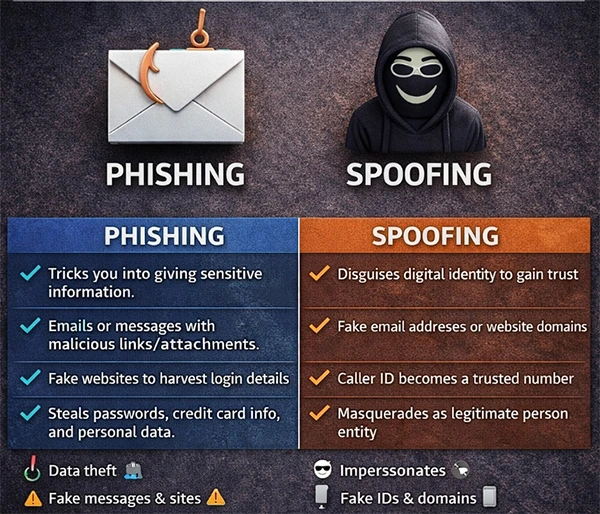
So, what’s the difference between phishing and spoofing? Here’s what:
Teaching the people in your household to pause on unexpected messages — to check before clicking, to verify before trusting — is one of the highest-value safety habits there is. Most scams die the moment their target stops and asks “is this actually real?” instead of reacting.
Scams aren’t limited to emails and text messages. Every app your family downloads, every website you create an account on, and every online service storing your information becomes part of your digital footprint. Then there are the services storing photos and schoolwork and payment details. Each one is a place where personal information lives, and not all of them treat that information with the same care.
For parents, some of this vetting is about content and appropriateness, which is its own important conversation. But part of it is about security — whether a service is built to protect the data it collects or whether it’s a leak waiting to happen. A poorly secured app doesn’t just risk your child’s information; a breach can expose the whole family, because the details people hand over online tend to connect back to real identities, real accounts, and real money.
You can’t personally audit the security of every service your family touches — but it helps enormously to understand that the trustworthy ones are doing serious, continuous work behind the scenes to stay safe, and the sketchy ones usually aren’t. Reputable platforms don’t just secure themselves once and forget it. They constantly test their own systems for weaknesses, watching for the exposed points an attacker could exploit. Tools like Aikido Security exist precisely for this — they let companies monitor their own attack surface and probe their live systems for vulnerabilities the way an attacker would, so problems get caught and fixed before someone malicious finds them. When you use a service that takes security this seriously, that invisible diligence is a big part of what’s keeping your family’s data safe.
The practical takeaway for a household isn’t that you need to become a security auditor. It’s a mindset: prefer established, reputable services over obscure ones that appeared overnight; pay attention to a company’s track record with security and privacy; and treat an app’s seriousness about protecting your data as a real factor in whether it earns a place on your family’s devices. The companies quietly doing the hard work of testing and monitoring their systems are the ones worth trusting with your information.
Technology can reduce risk, but habits provide lasting protection. The safest families aren’t necessarily the most tech-savvy; they’re the ones who consistently make smart decisions before clicking, downloading, or sharing information online. A few of their habits are worth building into the rhythm of a household, including regularly checking have I been hacked to identify potential security issues early.
The first is a culture of pausing. Most online harm depends on a quick, unthinking reaction — a click, a reply, a shared piece of information. A huge share of threats are automatically defused in a family where the norm is to:
This is especially worth teaching children, who are wired to move fast and trust easily.
The second is open conversation. Kids run into confusing or unsettling things online, and whether they come to a parent about it depends entirely on whether talking about it feels safe. A household where digital life is discussed openly, without immediate panic or punishment, is one where problems surface early instead of festering in secret. The goal is to be the person your child turns to when something feels wrong, not the person they hide it from.
The third is verification as a default. Whether it’s checking a suspicious domain, confirming an unexpected request through a second channel, or looking into an app before installing it, the habit of checking rather than assuming is what turns awareness into actual protection. The tools to do this are free and simple; what makes the difference is remembering to use them.
The internet doesn’t have to feel like a place filled with hidden dangers. Now, even AI has entered the field and is batting from both sides.
While online threats continue to evolve, the habits that protect you remain surprisingly straightforward:
None of it requires deep technical knowledge. It requires awareness, a willingness to pause and verify, and the small effort of using the tools that reveal what’s really going on beneath the surface. Families who build these habits don’t just avoid the obvious scams — they navigate the whole digital world with more confidence and a lot less fear, which is exactly the point.
Look for unexpected requests, urgent language, suspicious links, unfamiliar sender addresses, and demands for personal or financial information.
Not necessarily. Security depends more on the developer’s reputation and practices than on price.
Focus on building simple habits in children to pause before clicking unfamiliar links, avoid sharing personal information, and ask a trusted adult whenever something online feels confusing or suspicious.